How to Sign Up with an Email Invitation
Accept an email invitation from a Wire administrator and create your account in one step. Setting up your account from an invitation takes about a minute.
Got a signup link instead?
If a colleague shared a URL like https://wire.pluckyworks.org/onboarding/network-signup/... rather than an emailed invitation, follow How to Sign Up with a Signup Link instead. That flow handles outlet selection and Group terms in the same wizard.
Before You Begin
You will need:
- An invitation email from Wire
- Access to the email inbox where you received the invitation
Info
Invitations expire after 3 days and can only be used once. If yours has expired, ask the administrator who sent it to send you a new one.
Instructions
Open the Invitation
-
Open the invitation email you received from Wire. The subject line is "Invitation to Plucky Wire".
-
Click the registration link near the bottom of the email, just below the line that begins "To accept...".
The link takes you to a Wire registration page that already knows who invited you and which Outlet or Group you're being added to.
Fill In the Registration Form
-
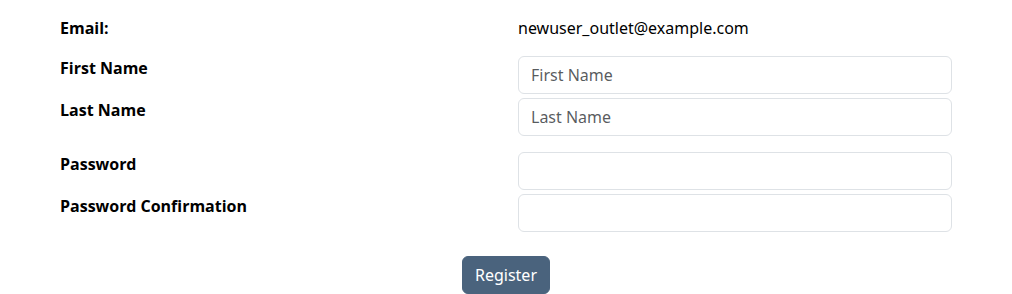
Enter your first and last name.
-
Choose a password and enter it in both password fields.
Your email address is pre-filled from the invitation and cannot be changed. If you'd prefer to use a different email, ask the administrator to resend the invitation to that address.
-
Check Time zone, which starts with your browser's selection when available. To change it, type a city or time zone and choose a suggestion.
-
Click Register.
What Happens Next
You're signed in automatically and added to the Outlet (your news organization on Wire) or the Group (the collection of Outlets you've agreed to share stories with) that invited you. The administrator who sent the invitation does not need to take any further action; you appear in their member list right away.
You'll land on your Wire home page. From here you can start finding stories, uploading your own, or filling out the rest of your profile.
Next Steps
- Find stories shared by the other Outlets in your Group
- Upload a story to share with your Group
Troubleshooting
-
My invitation has expired: Contact the administrator who sent the invitation and ask them to send you a new one. Invitations expire after 3 days.
-
I already have a Wire account with a different email: Contact the administrator who invited you. Ask them to either send a new invitation to your existing account's email address, or to add your existing account to the Outlet or Group directly.
-
The Accept Invitation link doesn't work: The invitation may have already been used or may have expired. Ask the administrator to send a new one.
-
Still stuck? Contact the administrator who sent the invitation, or email support@pluckyworks.org.