How to Sign Up with a Signup Link
Use a Wire signup link from a Group administrator to register your account, join an Outlet, and join a Group, all in one guided wizard. The whole flow takes about five minutes.
Got an invitation email instead?
If you received an emailed invitation with an Accept Invitation button rather than a URL, follow How to Sign Up with an Email Invitation instead. That flow is shorter and handles Outlet membership for you.
Before You Begin
You will need:
- A signup link from your Group administrator (these usually start with
https://wire.pluckyworks.org/onboarding/network-signup/...) - A valid email address
- Access to your email inbox to receive a verification code
- Your Outlet's name, website URL, and a contact email (an Outlet is your news organization on Wire), in case you need to register it from scratch
Instructions
Register Yourself
-
Click the signup link your Group administrator shared with you.
-
Enter your email address, a password (twice), and your first and last name.
Check Time zone, which starts with your browser's selection when available. To change it, type a city or time zone and choose a suggestion. Your selection is kept while you verify your email.
-
Click Continue.
-
Open your email inbox and look for a 6-digit verification code from Wire.
-
Enter the verification code on the page and click Verify Code.
If you already have a Wire account, sign in with your existing email and password instead. The wizard will skip the verification step and take you to Outlet selection.
Join or Create Your Outlet
After verifying your email, choose which Outlet you'll represent on Wire.
If your Outlet already exists on Wire:
-
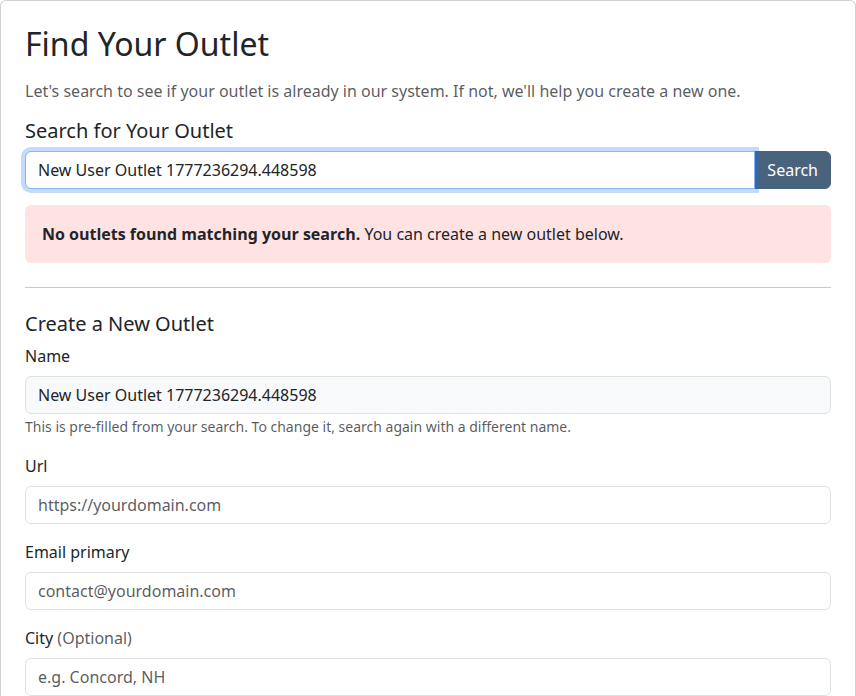
Type your Outlet's name in the search box and click Search.
-
Find your Outlet in the search results.
-
Click Join This Outlet.
If your Outlet isn't on Wire yet:
-
After searching, scroll to the Create a New Outlet form. Your search query is pre-filled as the Outlet name.
-
Enter your Outlet's website URL and a primary contact email. You can also add an optional location and description.
-
Click Create Outlet and Continue.
Automatic vs. manual approval
If your email domain matches your Outlet's website domain, your request is approved automatically and you continue to the next step.
Otherwise, an administrator at the Outlet has to approve your request manually. We'll let them know you're waiting. Plucky staff can also help. Don't be afraid to ask if you're on a deadline.
Accept the Group's Terms
Note
If you joined an existing Outlet that's already a member of the target Group, you'll skip this step and go straight to the Search page.
-
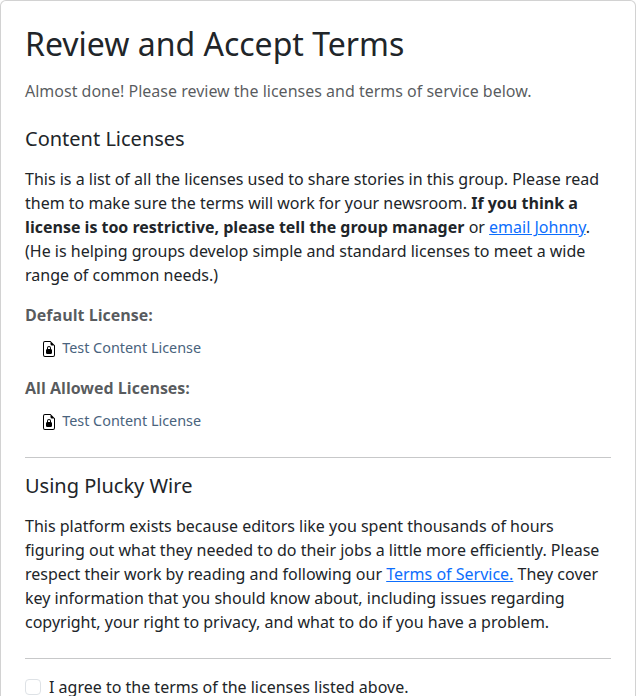
Review the Group's content license agreement, the legal terms that govern how stories are shared.
-
Review the Wire Terms of Service.
-
Check both boxes to accept the terms.
-
Click Complete Signup.
What Happens Next
You'll land on the Group's Search page, where you can browse and download stories shared by every Outlet in the Group. Your account, your Outlet, and your Group membership are all set up.
If your Outlet was newly created, Plucky staff will review it within 1–2 business days to confirm it produces original reporting. You can sign in and look around in the meantime, but your Outlet can't upload stories until verification finishes.
If your request to join an existing Outlet is awaiting manual approval, you'll receive an email when an administrator (or Plucky staff) approves it.
Next Steps
- Find stories shared by other Outlets in your Group
- Upload a story once your Outlet is verified
Troubleshooting
-
My signup link has expired: Contact your Group administrator and ask them for a new link.
-
I already have a Wire account: Sign in to your existing account first, then click the signup link. You'll skip the email verification step and go directly to Outlet selection.
-
I already have a Wire account and I've already joined an Outlet: Sign in to your existing account first, then click the signup link. You'll go directly to the final step, where you can review the Group's terms and confirm your membership.
-
My request to join an Outlet is still pending: Outlet administrators receive an email when someone requests to join. If your request has been pending for more than a day, reach out to a colleague at your Outlet who is already on Wire and ask them to approve you. If no one at your Outlet is on Wire yet, contact Plucky staff.
-
Still stuck? Contact your Group administrator, or email support@pluckyworks.org.