How to Set Up Custom Alerts
Set up Custom Alerts, the emails Wire sends you when new stories, photos, and livestreams match one of your saved searches. Matches from all of your saved searches are collected in one Custom Alerts email. Setting this up takes about two minutes per saved search.
Want the emails to stop?
See How to Stop Custom Alerts to unsubscribe or to turn off email for a single saved search.
Before You Begin
You will need:
- A saved search (see Save a Search)
- Custom Alerts turned on for your account (see Manage Email Preferences)
Note
Two settings control Custom Alerts: one on each saved search, and one on your account. Both must be on before Wire sends you anything.
Instructions
Turn On Email While Saving a Search
-
Go to the Search page at https://wire.pluckyworks.org/search/ and set up the search you want to be notified about.
-
Click Save this search in the Filter panel on the left side of the page.
A modal (a pop-up window) opens.
-
Check the Name. Wire suggests your search words; change it to anything up to 30 characters.
-
Tick Alert me to new matches.
Underneath, Wire tells you when the emails arrive, based on the schedule on your account. For example: "We'll send you all your saved search results in a single email, as soon as any new matches appear." Click Change schedule next to that line if you want a daily or weekly email instead.
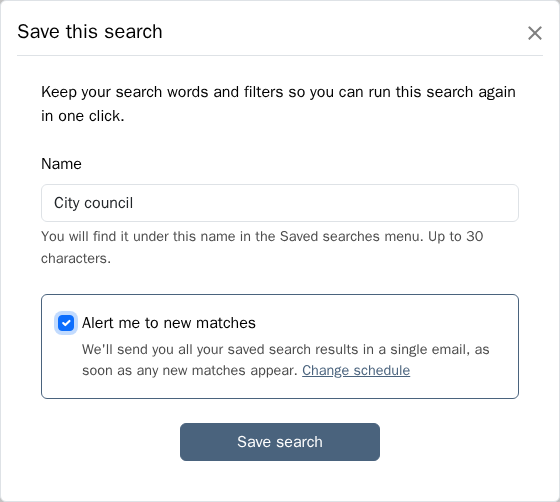
If you see Custom Alerts are off for your account instead of the checkbox, follow the link in that message, or see Turn On Custom Alerts for Your Account. You can save the search now and turn on its email later.
-
Click Save search.
The modal changes to Search saved and confirms This search will email you new matches.
-
Click Done.
Turn On Email for a Search You Already Saved
-
Go to the Search page at https://wire.pluckyworks.org/search/.
-
Click Manage next to the Saved searches... dropdown at the top of the Filter panel.
The Manage saved searches modal opens. A note above the list tells you when your Custom Alerts email arrives, with a Change schedule link.
-
Find the card for your saved search and turn on Alert me to new matches.
The setting saves as soon as you change it.
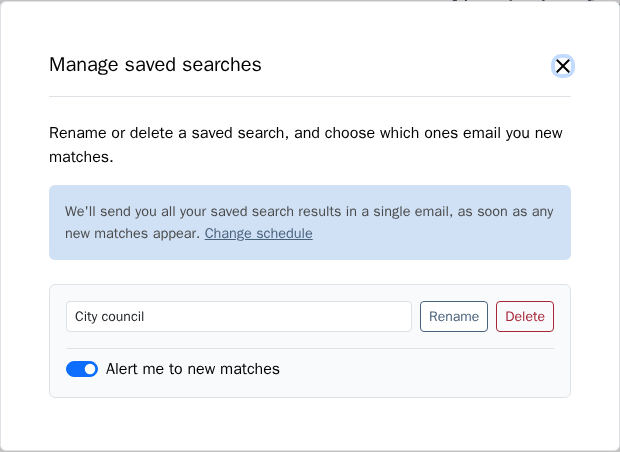
If you see Custom Alerts are off for your account and no Alert me to new matches switches, turn on your account setting first. See Turn On Custom Alerts for Your Account.
Turn On Custom Alerts for Your Account 
Your account setting controls Custom Alerts for every saved search at once. If it is off, Wire keeps your saved searches but sends no email for any of them.
-
Open your account settings at https://wire.pluckyworks.org/settings/.
-
Go to the Email Preferences section.
-
Turn on Custom Alerts.
The setting is described as: "Get email updates when new content matches searches you've marked for email delivery."
Make a Broad Search Eligible for Email
Some searches work well as bookmarks but are too broad, or change too often, to produce a useful email. For those, Wire leaves out the email option when you save the search, greys out the switch in the Manage saved searches modal, and tells you why.
| What Wire shows | What it means | What to do |
|---|---|---|
| Bookmark-only searches cannot send email. | The search is filtered only to your Outlet's bookmarks. | Add a search word or another filter, or use this search as a bookmark instead. |
| Your search is currently too broad for us to set up Custom Alerts. (when saving) or Add a word or filter to enable email. (when managing) | The search is blank, uses only the Last 24hrs filter, or is built only from exclusions. | Add a search word or a specific filter. |
Filters specific enough to enable email include a Group, Outlet, tag, series, License, date range, word-count range, photo size, photo source, or "has images." The email option becomes available as soon as the search is specific enough.
You can still save, open, and re-run a broad or bookmark-only search. Only the email option is unavailable.
What Happens Next
Wire combines ready matches from all of your email-enabled saved searches into a single Custom Alerts email:
- The subject line starts with Plucky Alerts: followed by a count of what matched, for example "Plucky Alerts: 2 stories, 1 photo." Search your inbox for "Plucky Alerts" to find past emails.
- The email groups content by type and by saved-search name, so you can see why each item was included.
- A story that matches two of your saved searches appears under both names in the same email.
- Links in the email take you back to the search and the content in Wire.
- Wire checks your access again while preparing the email. Content you can no longer reach is left out.
- Timestamps in the email use the time zone on your profile. Publication dates for stories and livestreams stay as entered. See Set Your Time Zone.
When the email arrives depends on the delivery schedule on your account. With Immediately, Wire groups new matches for at least ten minutes before sending. With Once a day or Once a week, matches collect until your chosen local time and are sent after it when processing runs, so delivery may be a little later than the exact minute. If Wire was unable to send for a while, it sends one catch-up email rather than one for each missed day or week. See Choose When Custom Alerts Arrive.
Wire emails a matching item once per saved search, based on the first time it matched. The same item will not be emailed again for that saved search later. It can still appear for a different saved search that it also matches.
If email delivery is temporarily unavailable, Wire holds the matches and sends them once delivery resumes rather than risking a duplicate email.
Next Steps
- Stop Custom Alerts if you want to unsubscribe or trim which searches email you
- Download a story you found through a Custom Alerts email
Troubleshooting
-
There is no email checkbox when I save a search, or the email switch is greyed out: If the message says Custom Alerts are off for your account, see Turn On Custom Alerts for Your Account. Otherwise the search is not specific enough to send email. Read the message Wire shows in its place and see Make a Broad Search Eligible for Email.
-
I see "We could not check your Custom Alerts settings just now": Wire was unable to read your account setting. Your saved searches are not affected. Close the modal and try again in a few minutes. If the message keeps appearing, email support@pluckyworks.org and include the details shown under the message.
-
I ticked the box but no email arrives: Check that Custom Alerts is on in your account settings. Both the per-search setting and the account setting must be on. When the account setting is off, the save modal replaces the email checkbox with Custom Alerts are off for your account and a link to turn it on, and the manage modal shows the same message and hides its Alert me to new matches switches. Your per-search choices are kept and come back when you turn the account setting on.
-
Matches arrived but the email has not: Check the delivery schedule on your account. A daily or weekly schedule holds matches until your chosen time, and content that arrives after an empty slot waits for the next one.
-
I turned everything on and still see nothing: Wire does not send matches retroactively. Email starts from content published or updated after you turn the setting on, so wait for new matching content to arrive.
-
A story appeared under two headings in one email: That story matched two of your saved searches. This is expected, and the heading tells you which search each copy came from.
-
A story I saw in Wire is missing from my Custom Alerts email: Your access is checked again when the email is prepared. If your Outlet or Group membership changed, or the story was removed, it is left out.
-
Still stuck? Contact your Group administrator for membership and permission issues, or email support@pluckyworks.org for technical problems.